

Your Home board
Home is a board of widgets showing what needs doing and helping you get on with it. Everyone has their own board, and it starts with widgets that suit your permissions.
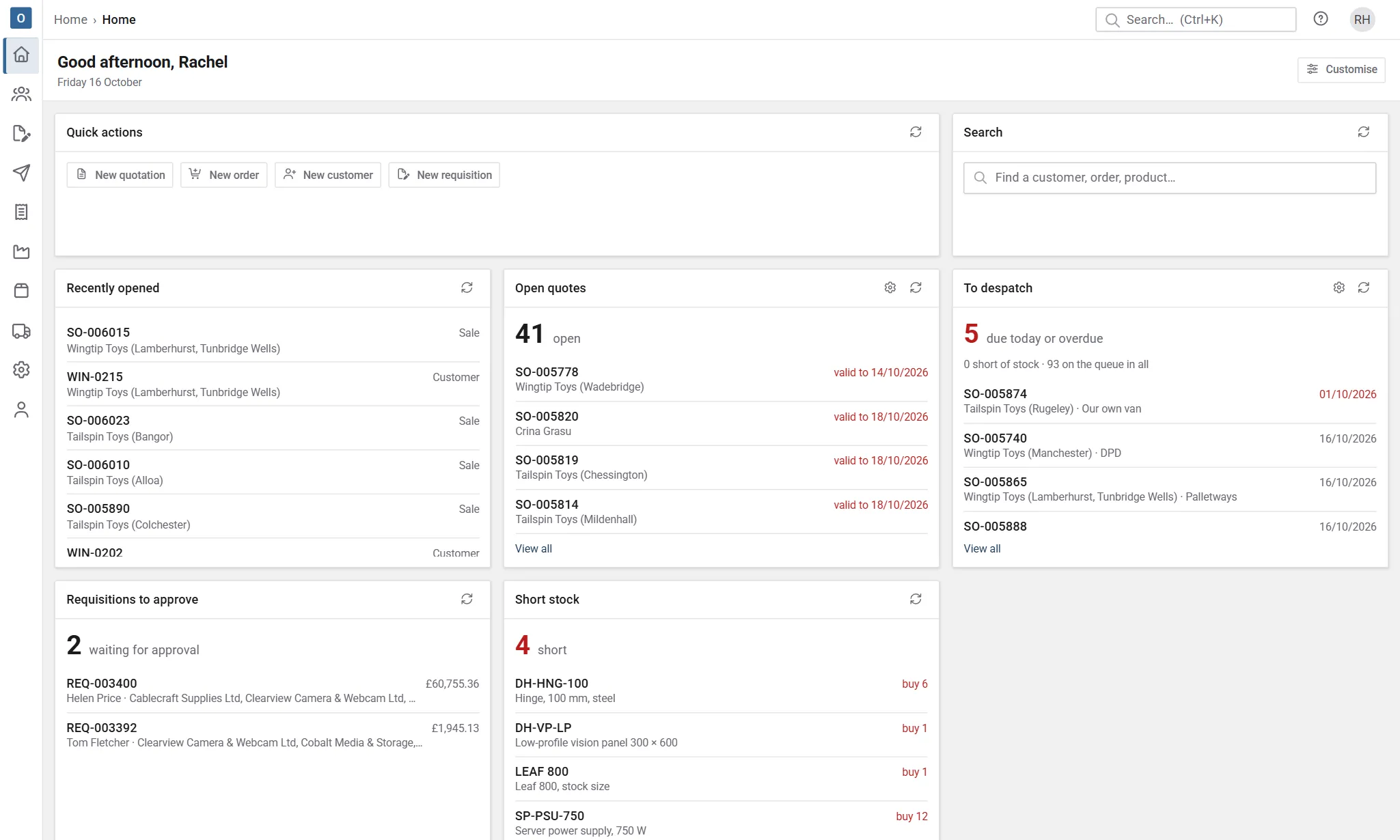
Widgets you can add
Section titled “Widgets you can add”What you can add depends on your permissions. The full set is:
| Widget | Shows |
|---|---|
| Quick actions | Buttons to start things, such as a new quote or purchase order. Only the ones you’re allowed to do. |
| Recently opened | The records you opened last: sales, customers, products, purchase orders and more. |
| Open quotes | Quotes and enquiries, with the ones about to expire first. |
| Orders in progress | Open orders, including part-delivered ones. |
| To despatch | Deliveries due today and overdue, and how many are short. |
| My picks | Deliveries you’ve been given to pick. |
| To invoice | Orders ready to invoice. |
| Overdue invoices | Unpaid invoices past their due date, with the total outstanding. |
| Not yet transferred | Issued invoices not yet sent to your accounts package. |
| Requisitions to approve | Requisitions waiting for you to approve. |
| To order | Approved requisitions not yet on a purchase order. |
| Goods due in | Deliveries from suppliers due now or overdue, with links to book them in. |
| Overdue purchase orders | Placed orders past their date. |
| Short stock | How many products are short, and the worst few. |
| KPI | One key figure, such as sales ordered or cash received, against an earlier period, with its trend. Add as many as you like. |
Count widgets show a number, the first few items, and View all, which opens the full list. Each widget refreshes itself every few minutes while Home is open.
Key figures (KPI widgets)
Section titled “Key figures (KPI widgets)”Each KPI widget shows one figure. Open its settings (the cog) to choose:
- Measure: sales ordered, quotes raised, win rate, gross margin, order book, invoiced, cash received, debtors, days to pay, on-time despatch, purchase spend or overdue purchase orders. You only see the ones your permissions allow.
- Period: this month, last month, this quarter, this year or the last 30 days. Quarters and years are calendar ones, so this year runs from 1 January.
- Compared with: the period before, the same time last year, or nothing.
- Show: everyone’s figures, or only your own sales, for the sales measures.
A period that’s still running is compared to the same point: on 2 October, this year so far is set against 1 January to 2 October last year, not the whole of last year. Hover over the comparison to see the exact dates and figure.
The line underneath is the trend: the last 12 periods (5 for years), with the current one so far at the end.
Arrange your board
Section titled “Arrange your board”- Select Customise.
- Use Add widget to pick from the widgets you can have.
- Drag a widget by its title to move it, and drag its corner to resize it.
- Select Done to save the arrangement, or Cancel to leave it as it was.
To start again, select Customise then Reset to my default.
On a phone, widgets stack in one column in the order you saved. Rearranging works on a wider screen.
Start somewhere else
Section titled “Start somewhere else”If you’d rather land on another page when you sign in, for example To despatch in the warehouse, choose a Start page under My Account → Appearance. The logo always brings you back to Home.