

Manufacturing settings
Administration → Manufacturing settings sets how works orders behave. Changing them needs the Manufacturing permission Change manufacturing settings.
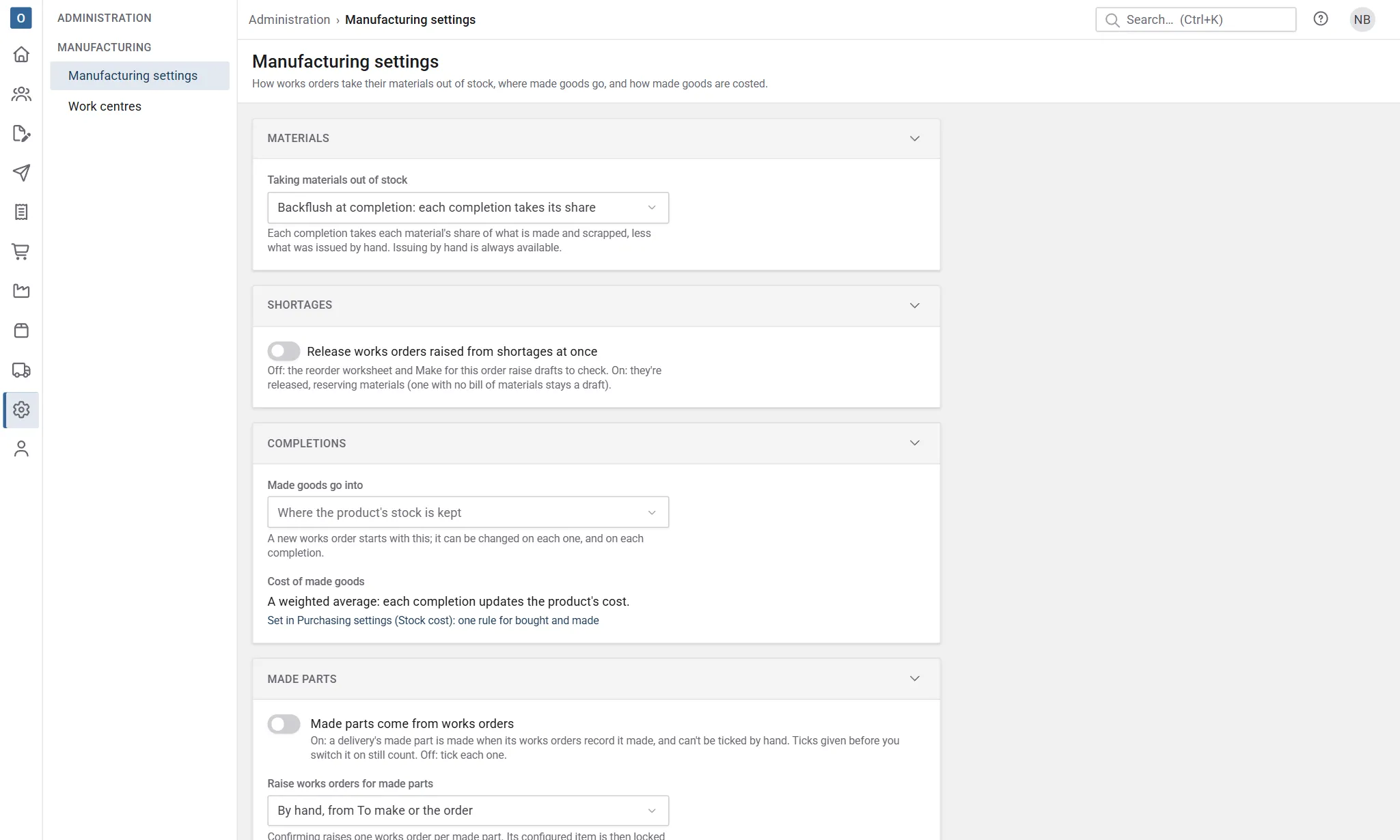
Taking materials out of stock
Section titled “Taking materials out of stock”Released works orders reserve what they still need until it leaves stock. Whatever you choose, materials can always be issued by hand on the works order, and what’s been issued is never taken twice.
- Backflush at completion (the default): each time you record what’s made, each material’s share of what’s made and scrapped is taken out of stock (required ÷ quantity × made and scrapped), less what’s already been issued by hand.
- Issue by hand: materials leave stock only when they’re issued on the works order. Recording what’s made takes none.
- By hand, backflushing the rest when the works order completes: issue materials as they’re used; the completion that finishes the works order takes whatever is still to issue.
Services on the bill of materials (labour, say) are costed at their share each time something is made, whichever you choose.
Shortages
Section titled “Shortages”Release works orders raised from shortages at once: works orders raised from the reorder worksheet’s Make view, or with Make for this order on a sale, are drafts to check and release when this is off (the default). When it’s on, they’re released straight away, reserving their materials; an assembly with no bill of materials still comes out as a draft.
Made goods go into
Section titled “Made goods go into”The stock location a new works order puts its made assemblies into. Leave it blank for where the product’s stock is kept (the location holding most of it), else the default location in Despatch settings.
Each works order can have its own location, and each time you record what’s made you can change it again.
Cost of made goods
Section titled “Cost of made goods”This follows Purchasing settings → Stock cost, so there’s one rule for what you buy and what you make:
- Leave the cost as typed on the product: making something doesn’t change its cost. Each works order still records what it actually cost.
- Keep a weighted average: each time something’s made, its cost becomes the weighted average of the stock on hand and what’s just been made, at the cost that completion took.
The setting is shown here with a link to change it in Purchasing settings.
Made parts
Section titled “Made parts”- Made parts come from works orders (off by default): on, a delivery’s made part is made when its works orders record it made, and can’t be ticked by hand; despatch waits for them. Off, each made part is ticked made on its delivery. Ticks given before you switch it on still count. Switching it off again sends planned and picking deliveries back to ticking; despatched ones keep what they were made on. See Despatch waits for works orders.
- Raise works orders for made parts: By hand, from To make or the order (the default), or When the order is confirmed, which raises one works order per made part as the order is confirmed. Its configured item is then locked until the works order is cancelled. See Made parts and works orders.
- Warn when the lead time can’t be met on confirming (on by default): confirming an order whose promised date is before its made parts can be ready shows a warning. It’s advice only: the order can still be confirmed, and its dates aren’t changed.
- Print the customer on works orders (off by default): off, the workshop’s works orders and job packs show the order, the item’s reference and details, but not the customer.
Cutting
Section titled “Cutting”Cutting unit (mm by default) is the unit lengths are in for cutting: products’ cut sizes and the cut pieces of made parts’ materials. It’s shown after lengths. A product stocked by a unit of length or area, such as metres or square metres, is converted to it: with mm, a metre is 1,000.
Choose it before setting up cut sizes and cut pieces: changing it later doesn’t convert the figures already typed in.
The rest of the section is for cutting lists, in the cutting unit:
- Saw kerf (3 by default, 0 to 100): what each cut takes.
- End trim (0 by default, up to 1,000): cut off each end of every bar before its pieces, to square it up.
- Minimum reusable offcut (300 by default): what’s left of a bar from this long is listed as a reusable offcut; shorter is waste.
- Optimise bars (on by default): cutting lists plan which pieces come from each bar, to use as few bars as they can. Off, they list the pieces and estimate the bars by length.
- Works orders need whole bars (on by default, with Optimise bars): when a made part’s works order is released, a material cut into bars and counted in whole bars (its unit of measure rounds quantities up) needs the bars its cutting list uses, rather than the configuration’s share of a bar. See Whole bars on the works order.
Changing them changes cutting lists from then on, and the bars of works orders released from then on.
Batching
Section titled “Batching”Combine made parts when raising says whether raising a made part’s works order (from To make, the order, or when the order is confirmed) puts it on an open works order that makes the same thing and hasn’t started, rather than a new one:
- Never (the default): each made part gets its own works order. You can still put several on one by hand, with Raise as one works order and Add to WO-… on To make.
- Same order: onto an open works order whose items are all on the same order, so identical items of one order (a schedule’s doors of one size, say) are made together.
- Any open order due within the window: onto any open works order for the same thing due no more than Batching window (working days) apart (0 to 60, 5 by default).
The made part goes on the lowest-numbered works order that fits. See Works orders for several items.
Costing
Section titled “Costing”Set-up in the rolled-up cost says how an assembly’s rolled-up cost counts the set-up minutes on its operations:
- Set-up charged to one made (the default): the set-up in full plus one run, the cost of one made on its own. It’s on the high side for an assembly you make in batches.
- Set-up spread over the costing batch quantity: the set-up is shared over the assembly’s Costing batch quantity, set on its bill of materials, plus one run. An assembly with no batch quantity counts as 1, so its set-up is charged in full as before.
For example, an operation with 60 minutes’ set-up and 6 minutes each at £30 an hour: charged to one made, its labour is 66 minutes, £33.00; spread over a batch of 10, it’s 6 + 6 = 12 minutes, £6.00. Works orders always spread their set-up over their own quantity, so either way the difference from what a works order actually costs shows as its variance.
Made parts’ works orders that made nothing says where the cost goes of a made part’s works order that finished with everything scrapped, or was closed before any was made:
- Charge their cost to the order (the default): it’s added to the made part’s actual cost on the order’s Works orders tab, so the made parts made later carry it and the margin on actual is lower. See Actual cost against the estimate.
- Leave it as production variance: the order’s actual cost leaves it out. Its cost shows only on Works order costs, as left on the works order.